
POST-PROC 2 Help & FAQ
POST-PROC 2 Tutorials
The following tutorials and notes make it easier to get started with POST-PROC 2.
Tutorial 1 – Supported data formats
POST-PROC 2 supports tab-separated TSV files and comma-separated CSV files. For tab-separated files, a time unit in the header, such as [h], is interpreted. For comma-separated files, the time values are always interpreted as seconds; a unit in the header has no effect.
Numeric values must use English number formatting without thousands separators, for example 12.2, 12e5 or -1.23e-12. Tab-separated files normally use the tsv extension, but POST-PROC 2 also accepts files with the csv extension.
1. Tab-separated values with relative time
Time [h]	Tout [C]	Variant 1 [C]	Variant 2 [C]
0	20	20	20
10	20	20	20.2651
13	20	20	21.1447
2. Tab-separated values with date and time
Date/Time	Tout [C]	Variant 1 [C]	Variant 2 [C]
2001-01-01 00:00	20	20	20
2001-06-24 05:00	20	20	20.0694
2001-06-27 05:00	20	20	20.783
3. Comma-separated values with relative time in seconds
Time [h],Tout [C],Variant 1 [C],Variant 2 [C]
0,20,20,20
9,20,20,20.0694
12,20,20,20.783
4. Comma-separated values with quoted headers
"time","outputs[1]","outputs[2]"
0,25,20
0.001,25,20.01
0.002,25,20.02
0.003,25,20.03
0.004,25,20.04
Tutorial 2 – Creating 2D diagrams
2D diagrams in POST-PROC 2 are always line diagrams. Several series with the same X axis and, if required, different Y axes are displayed in one diagram. A maximum of two Y axes is possible. If only one Y axis is used, it is always the left Y axis.
To create a diagram, select the required data sets in the data table and choose the columns or series to display. The configuration panel below the table provides the available options for the selected data format.
Titles, legends, lines, symbols, axes, units and scaling can be adjusted in the property panels. The diagram can then be saved with the session or exported for use in reports and presentations.
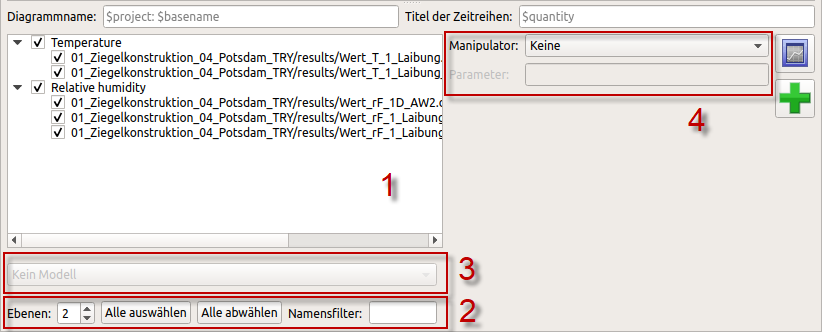
Tutorial 3 – Evaluating DELPHIN results
This tutorial demonstrates the complete workflow for analysing DELPHIN 6 simulation data with POST-PROC 2.
Read Tutorial 3 online →Further help
The online manual contains detailed explanations, examples and information about session files and scripting.
Open online manual →Contact support →