
MASTERSIM Help & FAQ
Frequently asked questions
Which FMI versions are supported?
MASTERSIM supports FMI co-simulation standards 1.0 and 2.0.
Can simulations be scripted?
Yes. The command-line simulator can be controlled from scripts.
Can several FMUs be coupled?
Yes. Several FMU instances can be used within one co-simulation.
MASTERSIM Tutorials
The following instructions provide an introduction to working with MASTERSIM.
Tutorial 1 – Building the project file
MASTERSIM uses a simple project file that describes the simulation scenario. The project file has the extension .msim and contains all data required to perform a simulation.
A second file with the same name and the extension .bm is saved in the same directory as the project file. It contains the graphical representation of the simulation scenario. Since the graphical network view is optional, the .bm file can be omitted, ignored or deleted.
# Created:    Di. Aug. 14 17:02:20 2022
# LastModified: Di. Aug. 14 17:02:20 2022

# Project file example for iterating GaussSeidel with time step adjustment
#
tStart                   0 s
tEnd                     12 s
hMax                     30 min
hMin                     1e-06 s
hFallBackLimit           0.001 s
hStart                   1e-07 s
hOutputMin               0.12 s
adjustStepSize           no
preventOversteppingOfEndTime yes
absTol                   1e-06
relTol                   0.01
MasterMode               GAUSS_JACOBI
ErrorControlMode         NONE
maxIterations            1
writeInternalVariables   yes

simulator 0 0 Part1 #ff447cb4 "fmus/simx/Part1.fmu"
simulator 1 1 Part2 #ffc38200 "fmus/simx/Part2.fmu"
simulator 2 1 Part3 #ffff0000 "fmus/simx/Part3.fmu"

graph Part1.x2 Part2.x2
graph Part1.x1 Part2.x1
graph Part2.x3 Part3.x3
graph Part3.x4 Part2.x4

parameters Part1.para1 14.3Tutorial 2 – Introduction and basic concepts
MASTERSIM is an FMI co-simulation master program. fmi-standard.org
MASTERSIM couples different simulation models and exchanges data between simulation slaves at runtime.
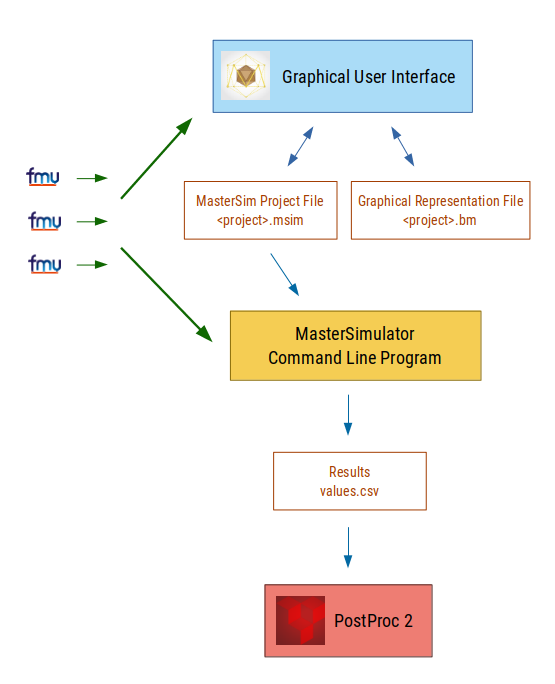
The GUI makes it easy to create, adjust and modify simulation projects. A simulation project is stored in two files: the MASTERSIM project file and the graphical representation (connection diagram). The latter is optional and not required for the simulation.
The simulation is executed by the command-line program MasterSimulator, which reads project files, imports referenced FMUs and performs the simulation. The generated results are then used by downstream tools to visualize and analyze the results. The free analysis tool PostProc 2 is particularly well suited for evaluating MASTERSIM results.
The separation between the GUI and the actual simulator makes it easy to use MASTERSIM in a scripted environment or for systematic parameter studies.
Special topics, tips and tricks
- Start with a fixed communication step size and a simple algorithm before enabling adaptive step size or iteration.
- Use unique slave names and descriptive connection names; this makes logs and project files easier to understand.
- If an FMU causes problems, inspect the extracted FMU directory and the modelDescription.xml file.
- The command-line option --skip-unzip is useful when testing a corrected modelDescription.xml repeatedly.
- Use the simulation statistics to identify FMUs or functions that take a disproportionate amount of time.